
AI Face Swap Online — Swap Faces in Photos in Seconds
Upload two photos and this AI face swap does the rest. It blends the new face into the original lighting, skin tone and grain, so the result reads as a real photograph rather than an edit. No Photoshop, no desktop app, no watermark — just a photo face swap that finishes before your coffee cools.
- ★ 4.9/5 from 1,284 users
- ~12s average generation
- Up to 2K downloads

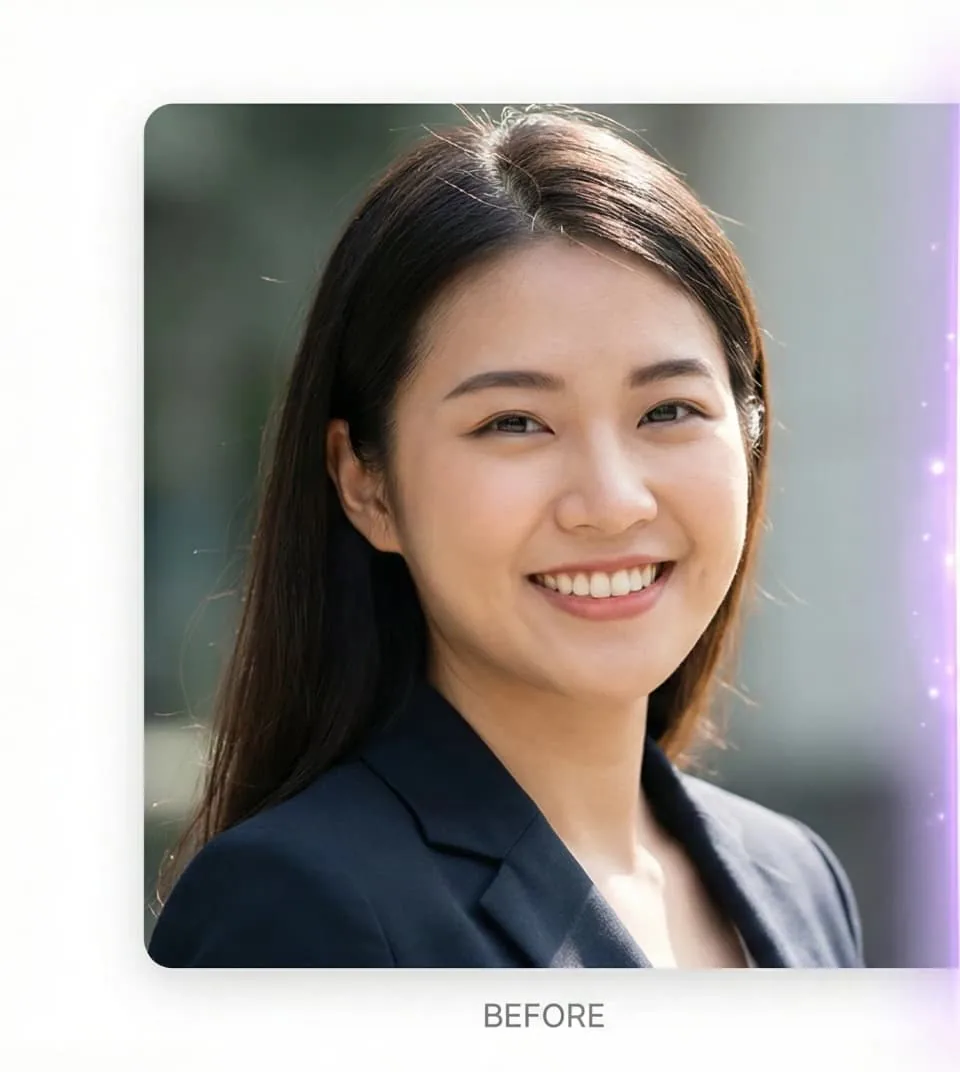
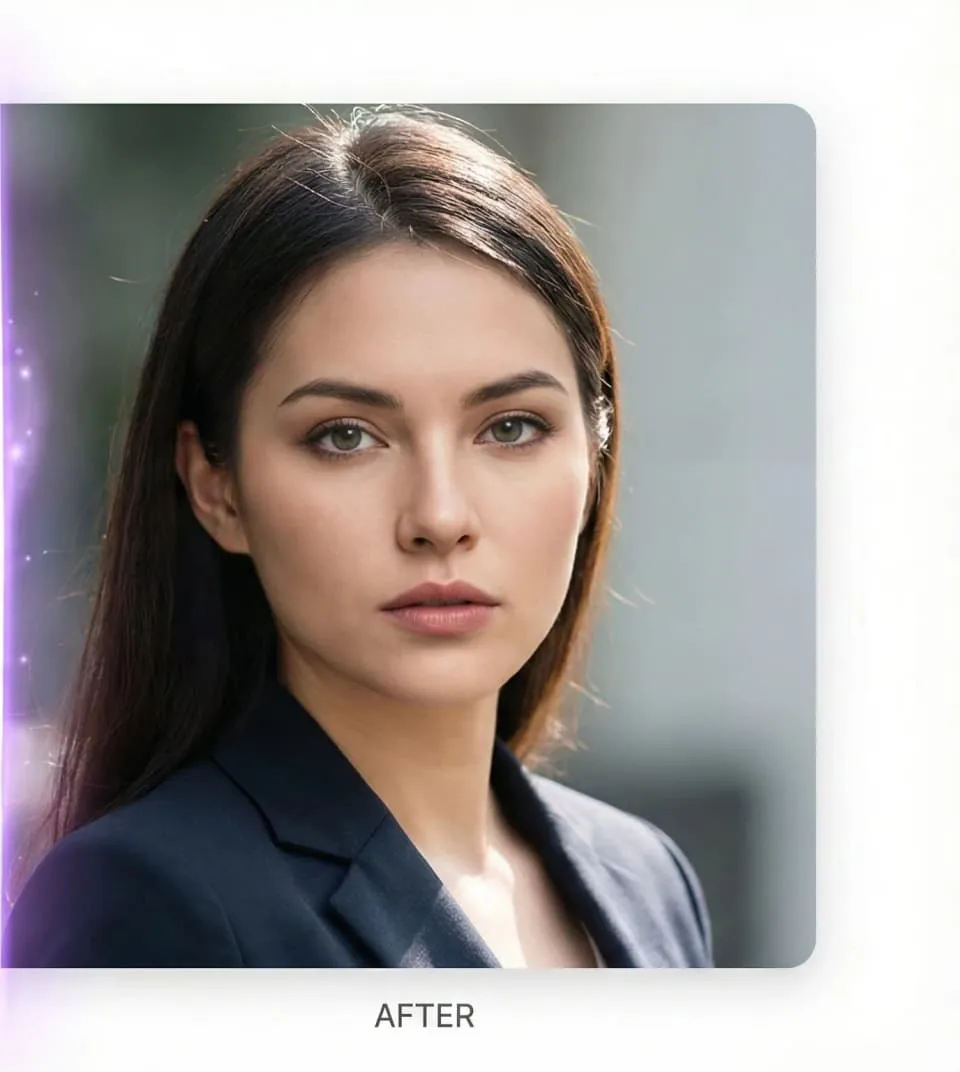
AI Face Swap Tool — Upload Two Photos, Get One Result
Drop in the photo you want to change and the face you want to use — or tap a sample to try it right now.
Nano Banana - Text To Image
Model
Enter Image Prompt
Aspect Ratio
Advanced Settings
▶Generated Images
No images generated yet
Enter a prompt and pick a model to start generating with GPT Image 2, Nano Banana 2.1, Nano Banana 2, Nano Banana
Please note that prompts involving policy-sensitive content or NSFW material may result in slower generation times or generation failures.
Real AI Face Swap Results
Every image below came out of the tool above with a one-sentence prompt. Click any result to enlarge it and check the edges, the hairline and the skin tone for yourself.
How the AI Face Swap Works
Three steps, about fifteen seconds, no technical knowledge required.
Upload the photo you want to change
Drop in the target photo — the wedding shot, the headshot, the movie still, whatever scene you want to keep. The AI face swap preserves its lighting, pose and background.
Add the source face
Upload a second image containing the face you want to blend in. A clear, front-facing photo gives the model the most detail to work with, but a casual selfie is usually enough.
Swap faces in seconds
Press generate. The face swap AI aligns the features, matches skin tone and grain, and returns a full-resolution image — normally in under fifteen seconds, with no watermark.
What Makes This AI Face Swap Different
Most free face swap sites run a five-year-old model, stamp a watermark on the output and cap you at 512 pixels. Here is what you get instead.
Photorealistic blending
The model relights the new face to match the original scene instead of pasting a flat cutout, so edges, shadows and film grain line up.
Skin tone and age matching
Tone, texture and apparent age are carried across automatically — the number one thing that gives cheap face swap tools away.
Multi-face control
Name the person in your prompt and the AI face swapper changes only them. Everyone else in a group photo stays untouched.
HD output, no watermark
Download up to 4K on every plan. No watermark is ever burned into a result, on any tier.
Runs in the browser
No install, no GPU, no Windows-only desktop app. This AI face swap online works the same on an iPhone as on a workstation.
Refundable, and credits never expire
See the results below before you spend anything. Buy credits, and if they are not for you, get a refund within 7 days — pro-rated for whatever you used.
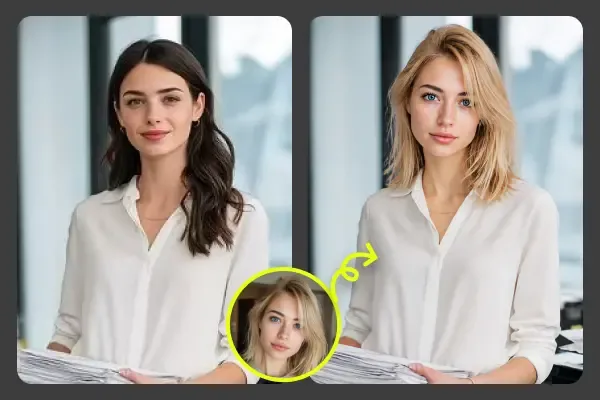
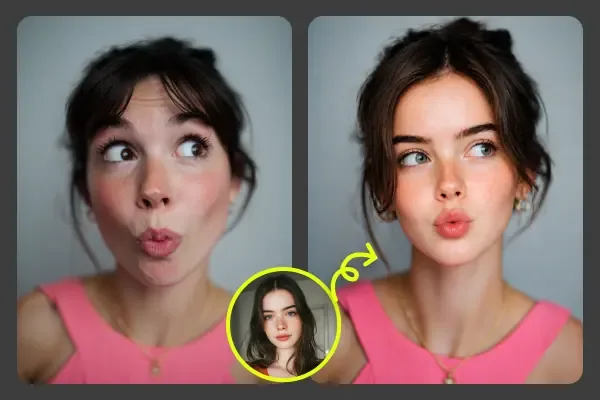
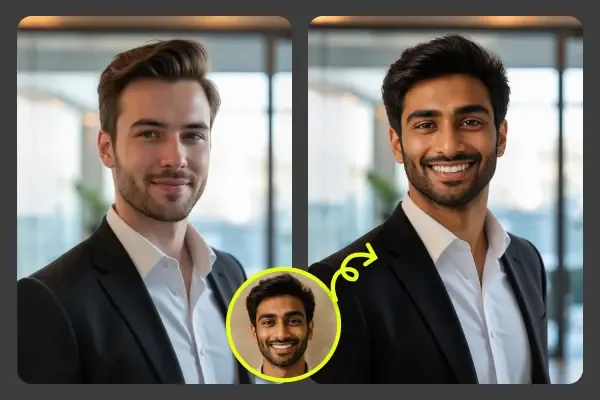
What People Use AI Face Swap For
The joke posts get the attention, but most face swap volume is quietly professional.
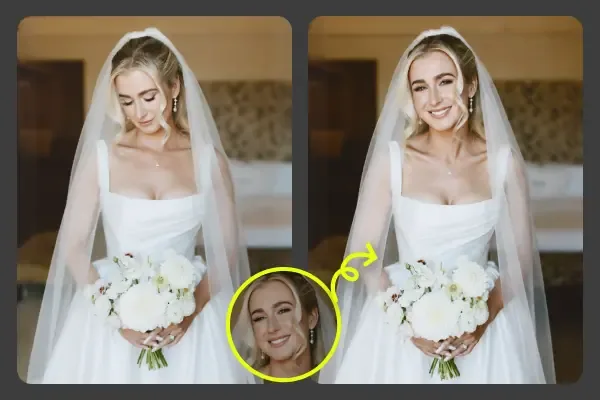
Rescue the photo nobody can reshoot
Someone blinked in the only good frame of the ceremony. Borrow their expression from a neighbouring shot and rebuild the keeper.
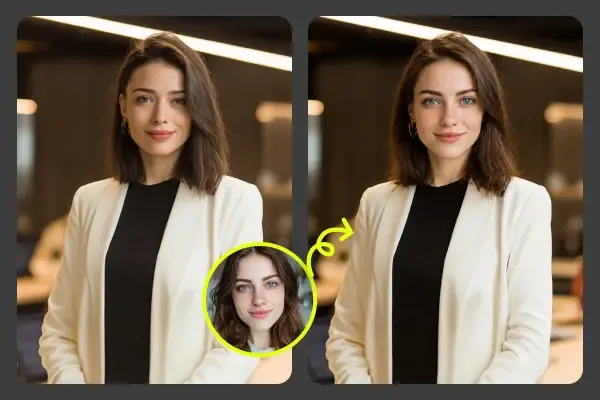
Consistent team headshots
Photos shot years apart in different offices never match. Swap current faces onto one shared set of business portraits and the whole team page lines up.
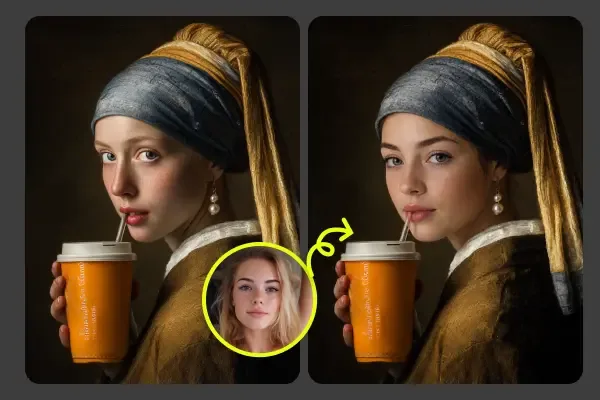
Put yourself in a masterpiece
Public-domain paintings are the most-shared format there is. Vermeer, Da Vinci, Klimt — the tool keeps the brushwork and only changes the face.
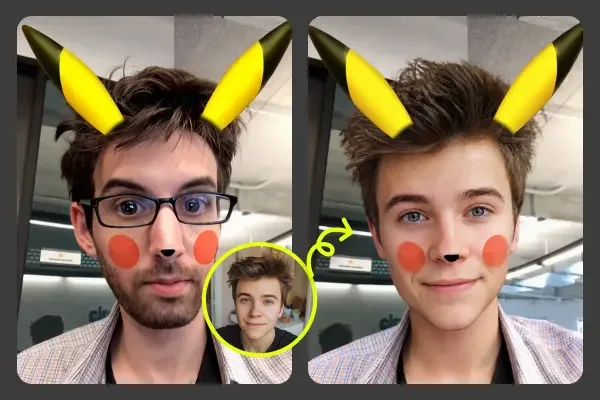
Memes and social content
A face swap is the fastest joke on the internet. Generate a dozen variants in a minute and post the one that lands.
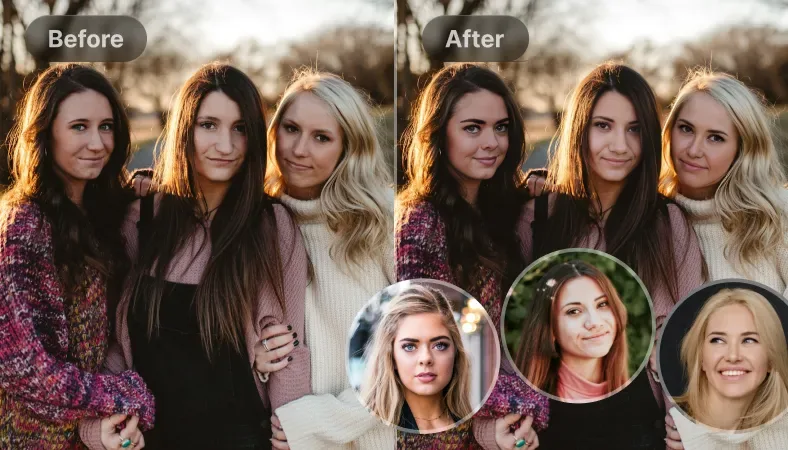
Group and family photos
Getting eight people to look good simultaneously is impossible. Composite the best version of each face into a single frame.
Loved by Photographers, Marketers and Meme Lords
What people actually do with the AI face swap once they stop testing and start shipping.
4.9 out of 5 from 1,284 AI face swap users
“A guest blinked in the only good shot of the whole reception. One AI face swap from another frame and the album was saved. The skin tone matched so well the couple never noticed.”
“We used to book a reshoot whenever a model was unavailable. Now we run a face swap on the existing plates. It has cut two days off almost every campaign.”
“Our team headshots were shot years apart in different offices. I swapped current faces onto one consistent set of business portraits — the LinkedIn page finally looks like one company.”
“Thumbnails are where I win or lose. Being able to swap my face into a dozen scene mockups in ten minutes doubled how many variants I can A/B test.”
“I put my students’ faces into famous paintings for an art history lesson. They lost their minds. Free AI face swap that runs on a school Chromebook is exactly what I needed.”
“Concept portraits for NPCs used to eat my whole art budget. I face swap a reference cast into costume shots and get usable character art the same afternoon.”
“Licensing model photos per region got expensive. Swapping faces onto the same product shots gives me localized creative without another shoot.”
“I tried four other face swap AI sites first. Two watermarked everything, one wanted a monthly subscription before showing me anything. Here I could see real results up front, and the credits I bought do not expire.”
“The multi-face handling is the real difference. Group shots stay untouched except the one person I name in the prompt. No other tool I tested got that right.”
“I generate the swapped still here, then animate it. Way more consistent than the frame-by-frame AI face swap video tools I was fighting with before.”
Bananaify vs Other Face Swap Tools
How a modern AI face swap compares with the free web tools and the mobile apps that dominate the search results.
Swipe the table sideways to see all three columns →
| Capability | Bananaify | Free face swap sites | Mobile face swap apps |
|---|---|---|---|
| 7-day refund, pro-rated on usage | ✓ | — | — |
| No watermark on any output | ✓ | — | ✓ |
| Works on phone browsers | ✓ | ✓ | — |
| Multi-face targeting in one photo | ✓ | — | — |
| Up to 2K resolution | ✓ | — | ✓ |
| No app or desktop install | ✓ | ✓ | — |
| Photos never used for training | ✓ | — | — |
The Complete Guide to AI Face Swap
An AI face swap replaces the face in one photo with the face from another, then rebuilds the lighting, shadows and skin texture so the join is invisible. Ten years ago this was a manual compositing job that took a retoucher an hour per image. Today a face swap AI does it in about twelve seconds from a plain-English sentence, which is why the technique moved out of post-production houses and into wedding albums, LinkedIn profiles and group chats.
How AI face swap technology actually works
The model does three things in sequence. First it detects and maps the facial landmarks in both images — eyes, nose bridge, jaw, hairline. Then it warps the source face onto the target geometry so head angle and proportions match. Finally, and this is the part cheap tools skip, it re-renders the blended region under the target photo's lighting: shadow direction, colour temperature, sensor noise, even lens softness. A good AI face swap gets that last stage right, which is why its output survives a full-screen look while a filter-app swap falls apart the moment you zoom in.
Getting a better face swap result
Input quality decides output quality. Use a source face that is well lit, roughly front-facing, and at least 512 pixels across — a passport-style photo beats a party shot every time. Try to match the head angle between the two images; the AI face swap can rotate a face perhaps 30 degrees convincingly, but a full profile onto a straight-on portrait will fight you. Sunglasses, heavy motion blur and hair covering half the face are the three most common reasons a swap comes back looking soft.
Be specific in the prompt. “Swap the face” works, but “swap the face of the woman on the left, keep her hairstyle and the original warm lighting” works better. Because Bananaify drives the face swap through a full instruction-following image model rather than a fixed one-button pipeline, you can also stack edits in the same pass — swap the face and change the outfit, or swap the face and convert the whole frame to black and white.
Free AI face swap vs paid tools
Search “free AI face swap” and most of what you find is free in the sense that a car dealership test drive is free. The typical pattern: generate at 512 pixels, watermark the preview, then ask for a monthly subscription to unlock the download you already made. Bananaify does the opposite — every result on this page came out of the tool, so you can judge the quality before you spend anything. Then you buy credits: a photo face swap costs four, output is unwatermarked at full resolution from the very first generation, and credits never expire. If it is not for you, ask for a refund within 7 days. Use 5% or less of your credits and you get the full amount back; beyond that the refund is pro-rated against what you actually used, so you are never locked into credits you did not want.
AI face swap for video
Video is the most requested extension of photo face swapping, and also the hardest — a per-frame face swap tends to flicker because each frame is solved independently. Our Video Face Swap tab takes the reliable route instead: you upload your own clip, up to 15 seconds, and Seedance 2.0 reads the whole thing as a reference rather than as a stack of separate frames. It solves the sequence in one job, so you get one consistent identity across the clip rather than a face that subtly changes every twelve frames. The original motion, camera work, framing, background, clothing and anyone else in shot come through untouched — add a face photo, set whether to keep the hairstyle and match the skin tone, and the finished clip comes back a few minutes later.
Using AI face swap responsibly
Face swapping is a creative tool with an obvious dark edge, and the line is not complicated: swap your own face, swap a friend who said yes, swap into a public-domain painting. Do not use any face swap AI to impersonate a real person, to fabricate something that looks like evidence, or to produce sexual imagery of anyone. Several jurisdictions now prosecute non-consensual synthetic imagery, and platform policies have caught up too. Bananaify blocks explicit and impersonation requests, and uploaded photos are never added to training data or published anywhere.
Where AI face swap goes next
The frontier is consistency: holding one identity steady across an entire photoshoot, a video, or a whole product catalogue. That is what turns a face swap from a novelty into infrastructure — a small brand shooting one set of product photos and localising the model for six markets, or a studio building character art without booking talent. The models improve every few months, and because Bananaify sits on top of several of them, the AI face swap here gets better without you changing a single habit.
The fastest way to judge any of this is to run one yourself. Open the AI face swap tool above, upload a photo and a face, and look at the result at full size. If the skin tone and the hairline hold up, you have found your face swap tool.
Bananaify Bananaify AI Plans
Professional image editing powered by Bananaify AI with unlimited revisions, priority access, and commercial rights for all Bananaify users.
🎁 Limited-Time Offer: Get 40% off Bananaify AI access
Buy Credits
One-time purchase, no subscription. Credits never expire.
100 Credits
Try it out
$19
USD
- 100 credits (~50 images)
- Credits never expire
- All AI models included
500 Credits
Most popular
$49
USD
- 500 credits (~250 images)
- Credits never expire
- All AI models included
- 2x better value than the 100 pack
1300 Credits
Best value one-time
$119
USD
- 1300 credits (~650 images)
- Credits never expire
- All AI models included
- Priority generation queue
Or Subscribe & Save
Credits are added every billing period at a better rate than packs.
Starter
For solo creators shipping regularly
$39
USD/month
- 430 credits per month
- Credits added every billing period
- Access to all Nano Banana AI models
- Commercial usage rights
- 24/7 email support
Cancel anytime
PRO
For teams that publish every day
$69
USD/month
- 850 credits per month
- Everything in Starter
- Higher per-period credit allotment
- Priority generation queue
- Early access to new models
- Priority email support
Cancel anytime
Advance
For studios and high-volume production
$249
USD/month
- 3,350 credits per month
- Everything in PRO
- Highest credit allotment and best rate
- Fastest generation queue
- Dedicated support channel
Cancel anytime
AI Face Swap FAQ
The questions people ask before their first swap.
A photo face swap costs 4 credits at standard resolution on every model, and higher resolutions vary by model — the exact total is shown on the button before you generate. Credit packs start at $19 for 100 credits, roughly 25 face swaps, and credits never expire. Rather than hand out a token free trial, we show you real output first: every result on this page came out of this tool, so you can judge the quality before spending anything. And if the credits turn out not to be for you, they are refundable for 7 days.
Video is billed per second, because that is how the underlying models charge us — a 15-second clip genuinely costs three times a 5-second one. When you supply a clip to swap into, billing counts the input seconds plus the output seconds, at a lower per-second rate than plain generation: Seedance 2.0 Mini runs 0.5 credits/sec at 480p and 1 at 720p, while Seedance 2.0 runs 2.5 at 480p, 5 at 720p and 12 at 1080p. So a 5-second clip rendered to 5 seconds bills 10 seconds — 10 credits on Mini at 720p. Every job has a 4-credit floor, and the exact total is shown on the button before you generate.
Yes, within 7 days of purchase. If you have used 5% or less of the credits, you get a full refund. If you have used more, the refund is pro-rated — you are charged only for what you actually generated and refunded the rest. That applies to credit packs and subscriptions alike. Email support and we will process it.
You can open the AI face swap tool on this page, set everything up and see exactly what it will cost without an account. You only sign in when you press generate, which takes one click with Google. No installs, no desktop software, no waiting list — but generating does require credits, which start at a few dollars and are refundable for 7 days.
Upload the target photo you want to edit, add the source face you want to blend in, and describe the edit — for example "swap the face in this photo with the face from the reference image, keep the original lighting and skin tone". The AI face swap runs in about ten seconds and returns a full-resolution image you can download.
Bananaify runs the same diffusion models used by professional retouchers, so the swap matches skin tone, lighting direction, grain and head angle instead of pasting a flat cutout. Hair, glasses and jewellery from the target photo stay intact. Most results are indistinguishable from an ordinary photo at social-media resolution.
Yes. Group shots work — just say which person to change in your prompt ("swap only the face of the man on the left"). The face swap AI keeps everyone else untouched, which is what makes it usable for team photos, wedding parties and family pictures.
Yes — there is a dedicated Video Face Swap tab next to the photo one. Upload your own clip, up to 15 seconds, plus one clear photo of the face going in. Seedance 2.0 reads the whole clip as a reference and solves it as a single job, keeping the original motion, camera work, framing, background, clothing and everyone else exactly as filmed. That is deliberately more reliable than frame-by-frame tools, which re-decide the face on every frame and visibly flicker. The render takes a few minutes.
Outputs come back at up to 4K depending on the model you pick, with no watermark on any plan. You can also choose the aspect ratio before generating, so a face swap made for a 9:16 story does not need cropping afterwards.
Uploads are used only to produce your result. We do not sell images, do not use them to train models, and do not publish them to any gallery. You can delete generated images from your dashboard at any time.
Swapping your own face, a friend who agreed, or a public-domain artwork is fine. Do not use any AI face swap tool to impersonate a real person, create misleading content, or produce sexual imagery of someone — that violates our terms and, in many countries, the law. Bananaify blocks explicit and non-consensual requests.
It runs entirely in the browser, so the AI face swap works on Windows, macOS, iPhone, iPad and Android with no app to install. All the processing happens on our servers, which means an old laptop produces exactly the same quality as a new workstation.
Start Your First AI Face Swap
You have seen the results above — every one came out of this tool. Credits start at a few dollars, never expire, and are refundable for 7 days. Upload two photos and your AI face swap is finished in about twelve seconds.
Swap Faces Now